As a switcher I’m several times faced with the awkwardness of the differences between my previous work environment (Linux) and my new one.
One of the most annoying ones has been the handling of the function keys. First I though that after a while I would get used to the mapping in OS X terminal, but then again I still work with too many Linux machines in the Lab, and therefore never really let go of old habits.
The point is therefore:
If you can’t adapt, bind the rules
Here’s the trick for my most annoying key mappings:
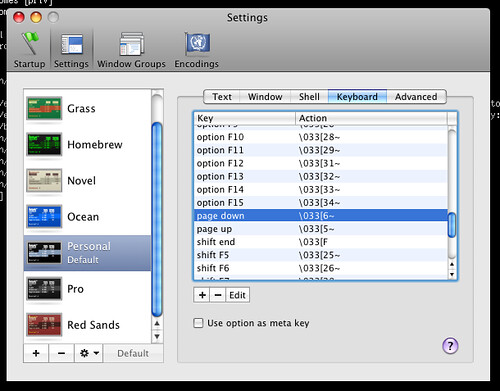
Go to “Terminal” -> “Preferences” Pick “Settings” Pick the desired key and press “Edit” Change the “action” to “send string to shell” and type the desired ESCAPE sequence
E.g.
- PageUp = \033[6~
- PageDown = \033[5~
- Home = \033[1~
For a full list of ESCAPE sequences refer to here.